Book a demo
Independent medical examinations

One exam.
Every angle.

Scheduling, exam capture, reports and billing in one system.

A doctor sees one appointment. You run everything around it. TrueExams is built for both sides of that exam — from the first referral through to the last invoice.

Meet us at WCI 2026 · Orlando World Center Marriott · Aug 23–26 · Booth 727
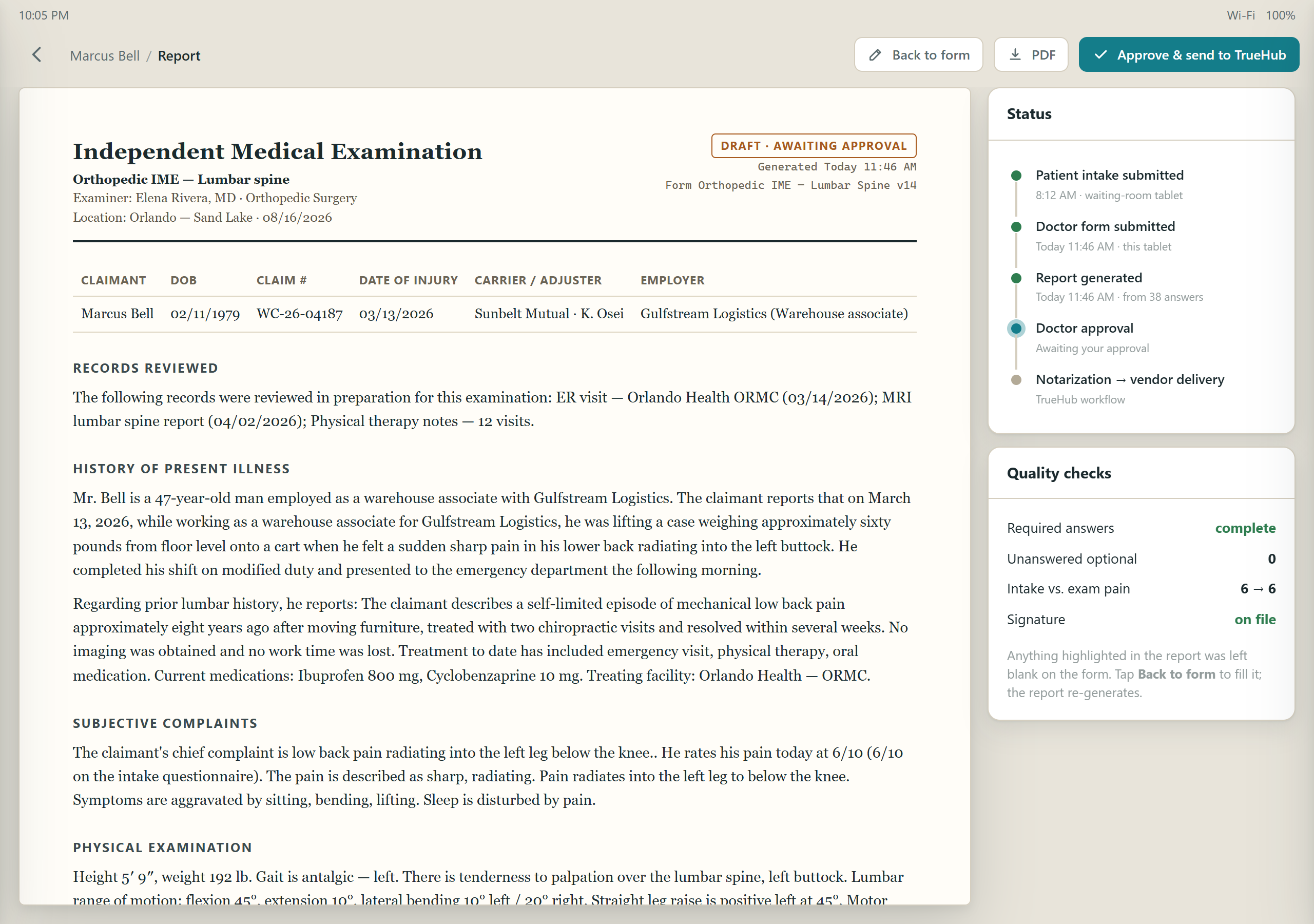
DynaPad on a tablet showing an Independent Medical Examination report generated from the exam answers
Walking outThe report is already written — generated from the answers the doctor tapped through during the exam.
20+Yearsrunning national claims operations, since 2003
13Stagesfrom referral to payment, each one a working queue
12Question typesand reports that write themselves from the answers
100%Customizableyour forms, your report layout, your workflow
Three products · one record

Nothing gets retyped.

The form is designed once, filled on the tablet during the exam, and turned into a signed report that lands straight in the workflow. Each product does one job and hands the record to the next.

Run the operation

DynaHubScheduling · workflow · billing

The web application your schedulers, typists, proofreaders and admins live in. Every appointment moves through thirteen tracked stages with its records, notes and status trail attached.

  • Visual scheduling with capacity limits
  • Reports inbox and medical-records upload
  • Fee schedules, invoices, audit log
The operations side →
Design the exam and the report

DynaFormForm builder · report designer

Build the questionnaire a patient and a doctor fill in — by specialty, case type and location — and design the narrative report that is generated from those answers. No developer required.

  • 12 question types, conditional follow-ups
  • Answers pre-filled from the record and prior visits
  • Report templates with data tags and rules
The form that writes the report →
Capture on exam day

DynaPadTablet exam capture

The doctor's tablet. Today's appointments, the claimant's records, a patient intake form and the doctor's exam form — with presets, dictation and signature — working with or without Wi-Fi.

  • Answer presets: reuse a whole exam in one tap
  • Autosave, restore points, offline queue
  • Signed report generated on submit
The doctor's side →
The doctor's side · DynaPad

One exam.
Zero paperwork.

Your exam form sits on the tablet, set up for your specialty and the type of case. Work through it during the exam and the report is written by the time you finish.

DynaPad

Answer once, reuse it forever.

The findings you write on nearly every case get saved once and drop in with a tap. Dictate the rest. The same paragraph never gets typed twice.

  • Presets for a whole form or a single section — a normal lumbar exam is one tap; then change the two findings that differ.
  • Answers carry forward — the intake the claimant filled in the waiting room, the case details and a re-exam's prior answers are already on the form.
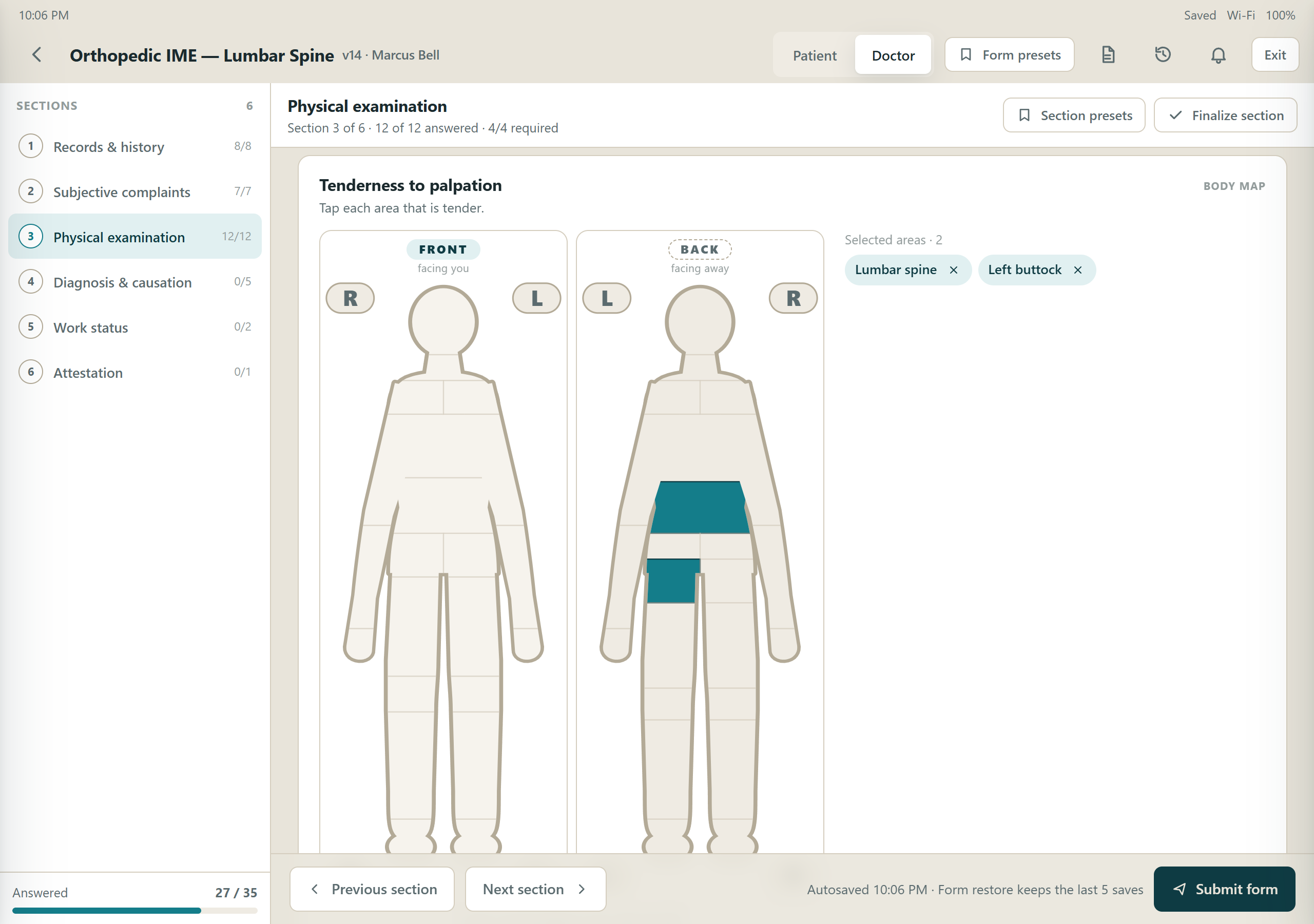
  • Every question type a real exam needs — body map, range-of-motion segments, pain slider, autocomplete medications and ICD-10, height, dates, rich text, signature.
  • Records on the tablet — the ER note, the MRI report and the therapy notes travel with the appointment, not in a folder somewhere else.
  • Autosave, restore points and an offline queue — every tap is saved on the device; a clinic without Wi-Fi is not a problem.
Doctor form · physical examination DynaPad exam form: sections on the left, height, gait, body map and range-of-motion questions on the right
Section presets fill fifteen answers at once. Then the doctor changes what is different about this patient.
Before exam
Today's cases are already at your fingertips

Appointments sync to the tablet with the claimant's file attached. History, prior exams, records and current medications are there before you start.

The exam
A form built for this exam

Forms are defined by specialty, case type and location, so you are not stretching one generic template over every kind of case.

As you go
Answer once, reuse it forever

Presets drop in the findings you write on nearly every case. Dictate the rest.

Walking out
The report is already written

Your answers come back as a finished, formatted report. No dictation tape, no transcriptionist guessing a week later.

Sign-off
It does not go out until you say so

Every report lands back in your queue before it goes anywhere. Your name does not leave the building until you have read it and signed it.

The connective tissue · DynaForm

The form that writes the report.

DynaForm is where a practice designs its exams and its reports — without a developer. Publish once and the tablet picks the new form up immediately.

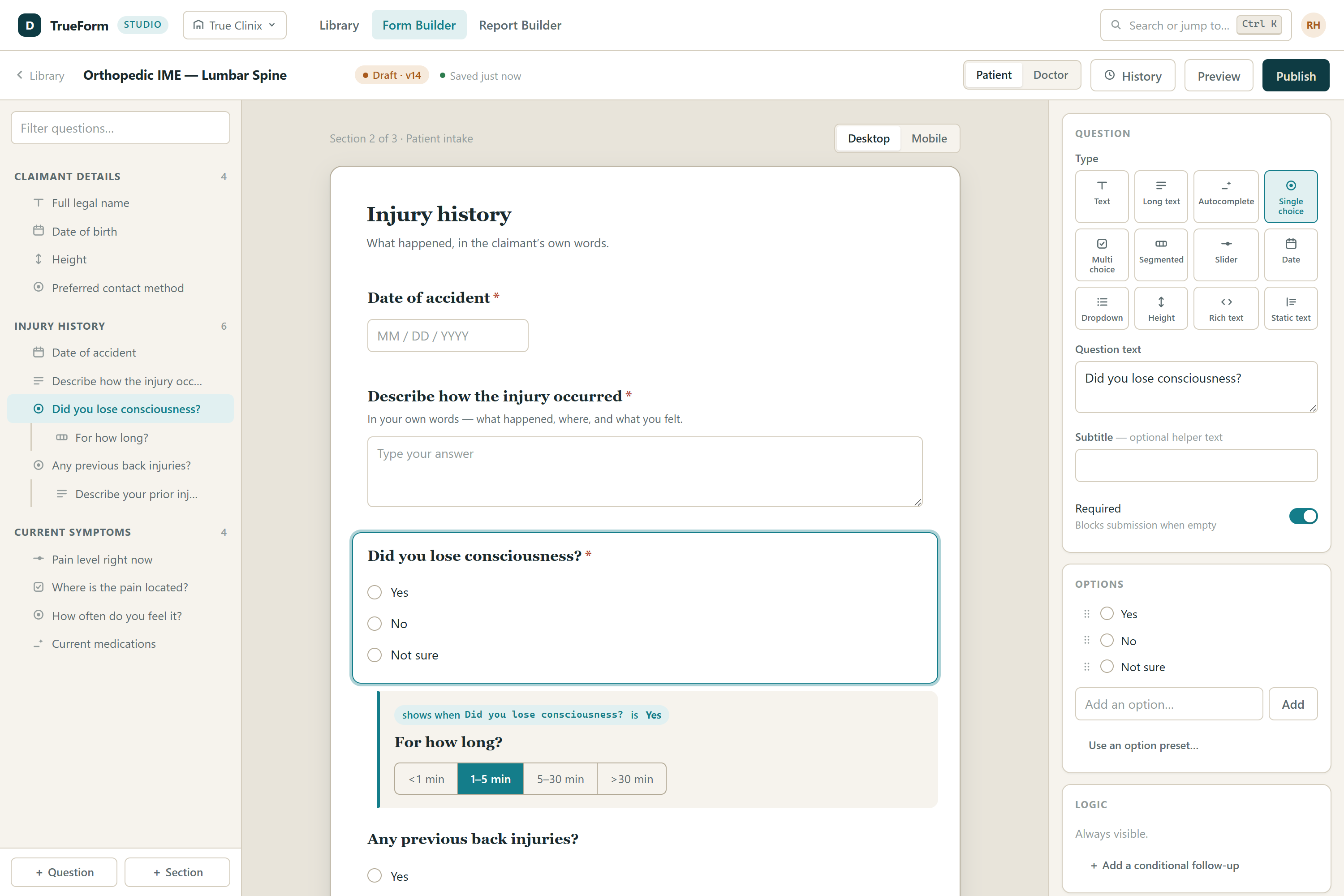
Form builder DynaForm Studio form builder: outline of sections and questions, live preview of the form, question inspector with type, options and logic
DynaForm · form builder

Two-sided forms, built by the people who run the exams.

  • A patient half and a doctor half — each section is flagged for the person who fills it in, and the report can pull from either.
  • Conditional follow-ups to any depth — a question opens further questions when the answer matches, nested as many levels as the exam needs.
  • Pre-filled from the record and prior visits — map a question to a claimant or case field, or mark it as claimant / case information so the last answer carries into the next appointment.
  • Doctor-specific questions, reusable option presets and shared autocomplete vocabularies for body parts, medications and facilities.
TextMultilineAutocompleteSingle choiceMultiple choiceSegmented numbersSliderDateListHeightHTML entryStatic text
DynaForm · report designer

Your report, your format — written from the answers.

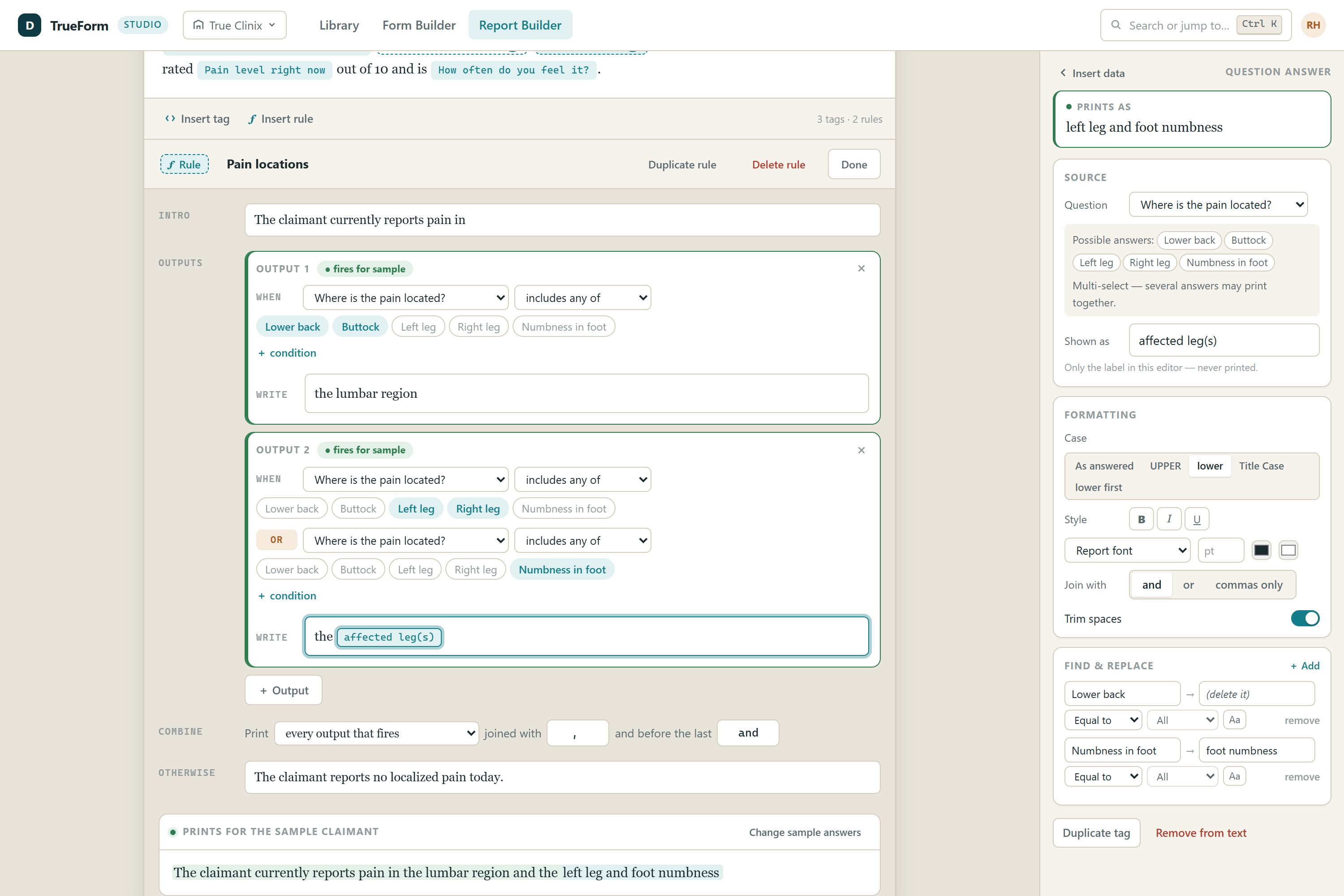
A report template per doctor per form. Answers drop in as styled data tags; paragraphs are wrapped in rules that decide when they appear. The service assembles the finished document for every appointment.

  • Data tags with formatting built in — case, connectors ("a, b and c" or "or"), trim, colour, and a find-and-replace list per tag.
  • A rules engine for conditional text — outputs gated by question and answer combinations, with And / Or / Not, connectors and an else text.
  • Grammar that follows the claimant — he / she, his / her, Mr. / Ms. resolved at generation time.
  • Publishing keeps doctors' presets in sync — republish a form and their saved answer sets are rewritten against the new structure instead of breaking.
Report designer DynaForm Studio report designer: narrative sections with inline data tags and a rule editor with conditional outputs
Design
DynaForm

Sections, questions, conditions, the report template. Published to the practice.

Capture
DynaPad

Patient intake and doctor exam on the tablet. Presets, dictation, signature.

Deliver
DynaHub

Report generated, approved, notarized, sent to the vendor and billed — one status trail.

The operations side · DynaHub

Thirteen stages.
Zero blind spots.

Scheduling, transcription, proofreading, approvals and billing. Every stage here is a queue somebody actually works from — not a status field waiting to be updated.

1Before the exam
  • Scheduled
  • Pending exam
  • Today's exam
2The exam
  • Exam completed
3Production
  • Processing
  • Meds breakdown
  • Typist review
  • Proofreading
4Approval
  • Vendor approval
  • Doctor approval
  • Notarization
5Delivery & billing
  • Sent to vendor
  • Billing

iThe Overview sits above all thirteen stages and shows every case at once, with the stalled ones flagged before a client calls to ask. Every move is stamped into a status trail you can read back months later.

You set your own limits

Daily and per-slot caps at company, doctor, location and specialty level — verified during scheduling, so nobody books a doctor past what they can do in a day.

Records on the tablet

Records and prior reports travel with the appointment. Upload medical records to the Reports Inbox; the tablet downloads them for exam day.

Roles that match the work

Administrators, scheduling secretaries, typists, proofreaders and vendor admins each get the queues their job needs — with field-level permissions.

Work in bulk

Move statuses, reassign doctors, add notes and print letters across a whole selection at once. Any view exports to Excel.

Each client sees only their own

Carriers, firms, referrers and vendors are kept apart in the database itself — not by a filter someone has to remember to apply.

Meds & prescriptions

A full drug reference covering dosages, forms, brands, warnings and allergy cross-checks, with dedicated meds-breakdown stages in the workflow.

Billing built in

Fee schedules by doctor, specialty, case type and company, itemized invoices with tax and discounts, PDF invoice output.

Answers when audited

Change logging plus a status history on every appointment. Re-exams book in one step, linked to the original, with the history attached.

See it for yourself

No pitch.
Just tell us where it hurts.

Built with the people who do the work — twenty years of answering "can it also do this?" Bring a real case; we'll walk it from referral to signed report on the spot.

WCI 2026 · Orlando
Workers' Compensation Institute
Orlando World Center Marriott

August 23–26, 2026. Come by for a look at the exam form, the scheduler and the workflow behind them — on a real tablet.

727Booth